
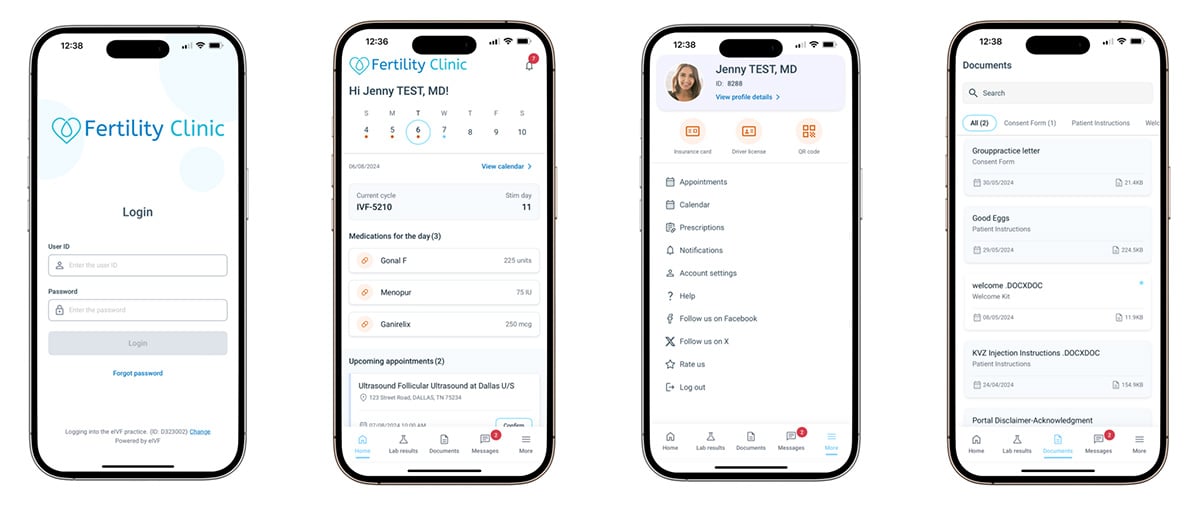
Managing your fertility journey has never been easier. The eIVF Patient App is designed to give you seamless access to your health information, appointments, and communication with us at InVia Fertility - all in one secure, easy-to-use platform. Whether you're at home or on the go, eIVF Patient App provides the tools you need to stay connected and confident every step of the way.
How do I access my medication instructions in eIVF Patient App?
Simply tap on the "Medications" tab in the app to view detailed instructions, dosage, and timing.
Can I see past appointments?
Yes, your full appointment history is available under the "Appointments" section, including both past and upcoming visits.
Is my information safe?
Absolutely. eIVF Patient App is built to prioritize patient privacy. All data is secure, and the app complies with HIPAA standards for secure communication.
What should I do if I forget my password or need help logging in?
If you forget your password, you can reset it by clicking the "Forgot Password" link on the login page and following the instructions. If you need further assistance with your login information, please contact us directly, as only we can provide support for login issues.
If you need assistance with the app, please contact your InVia team for support. We can help with login issues, navigating the app, and accessing specific information. Due to HIPAA guidelines, only we can assist with password resets if needed.
Enjoy managing your care on the go with eIVF Patient App!
Download the App
You can download eIVF Patient App on the App Store or Google Play.

|

|
Login and Setup
After downloading, log in using the credentials provided by the Invia Team. Your secure login ensures that your information is always private and protected. If you need further assistance with your login information, please contact us directly, as only we can provide support for login issues.
If you are still having trouble after following these steps, do not hesitate to call our front desk.
We appreciate your patience as we make improvements that allow us to care for you even better.

Entire Website © 2003 - 2020
Karande and Associates d/b/a InVia
Fertility Specialists